Comparing Open-Source Models: Benchmark on Your Own Data
When it comes to building LLM apps, there is no one-size-fits-all benchmark. To maximize the quality of your LLM application, consider building your own benchmark to supplement public benchmarks.
This guide describes how to compare open-source models like Mistral, Mixtral, Gemma, Llama, and Phi using the promptfoo CLI. You can mix and match any combination of these models — just include the providers you want to test.
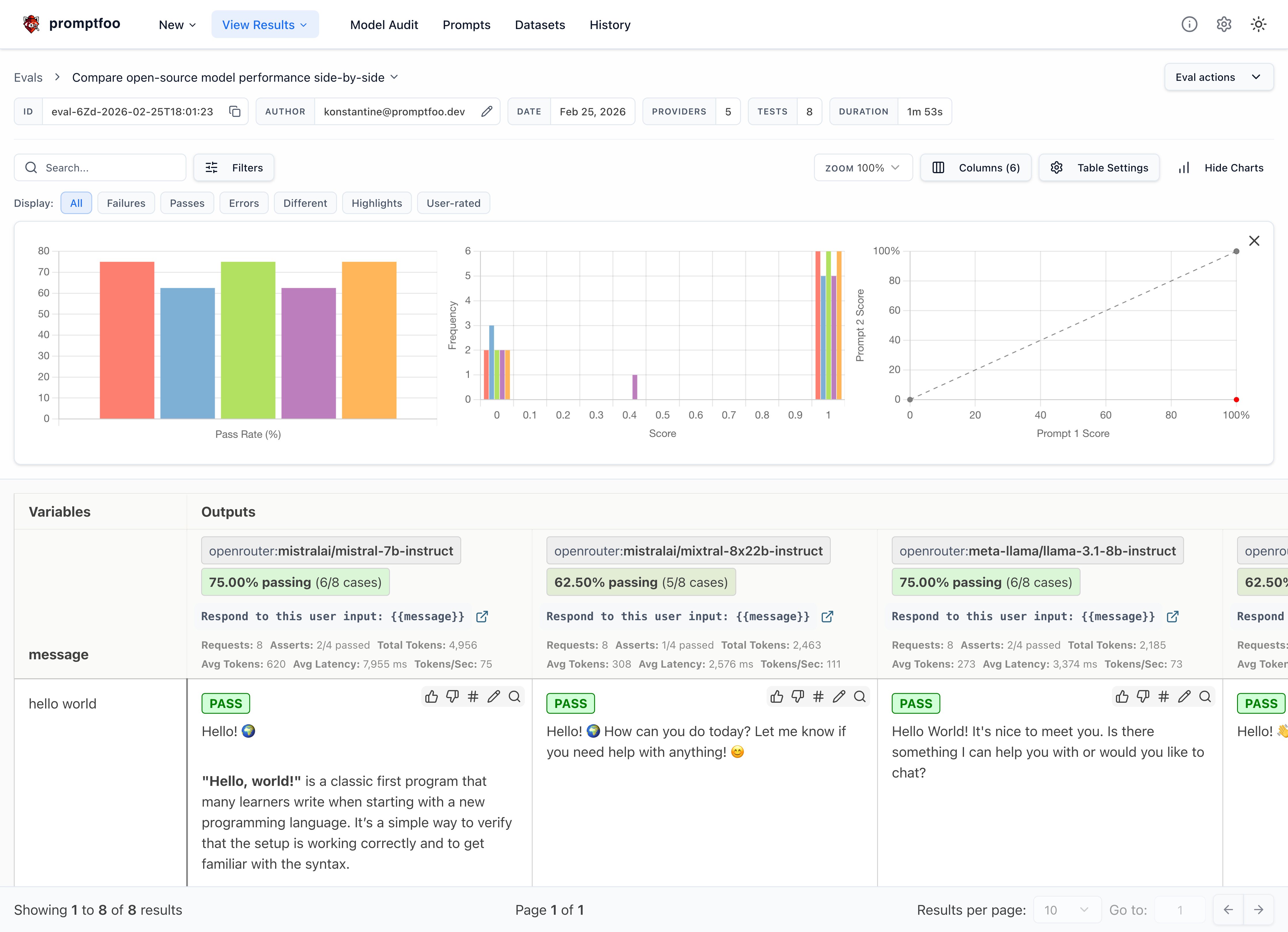
The end result is a view that compares the performance of your chosen models side-by-side:
Requirements
This guide assumes that you have promptfoo installed. It uses OpenRouter for convenience, but you can follow these instructions for any provider.
Set up the config
Initialize a new directory that will contain our prompts and test cases:
npx promptfoo@latest init --example open-source-comparison
Now let's start editing promptfooconfig.yaml. Create a list of models we'd like to compare:
providers:
  - openrouter:mistralai/mistral-nemo
  - openrouter:mistralai/mixtral-8x22b-instruct
  - openrouter:meta-llama/llama-4-scout-17b-16e-instruct
  - openrouter:google/gemma-2-27b-it
We're using OpenRouter for convenience because it wraps everything in an OpenAI-compatible chat format, but you can use any provider that supplies these models, including HuggingFace, Replicate, Groq, and more.
If you prefer to run against locally hosted versions of these models, this can be done via Ollama, LocalAI, or Llama.cpp. See Running Locally with Ollama below.
Set up the prompts
Setting up prompts is straightforward. Just include one or more prompts with any {{variables}} you like:
prompts:
  - 'Respond to this user input: {{message}}'
You should modify this prompt to match the use case you want to test. For example:
prompts:
  - 'Summarize this article: {{article}}'
  - 'Generate a technical explanation for {{concept}}'
Advanced: Click here to see how to format prompts differently for each model
If you're using different APIs that give you direct access to the raw model, you may have to format prompts differently.
Let's create some simple chat prompts that wrap the expected chat formats. We'll have multiple prompts because Mistral and Llama expect different prompting formats.
First, we'll put the Mistral chat prompt in prompts/mistral_prompt.txt using the special <s> and [INST] tokens that the model was fine-tuned on:
<s>[INST] {{message}} [/INST]
Next, we'll put the slightly different Llama chat prompt in prompts/llama_prompt.txt:
<|begin_of_text|><|start_header_id|>user<|end_header_id|>

{{message}}<|eot_id|><|start_header_id|>assistant<|end_header_id|>
Gemma uses its own format with <start_of_turn> and <end_of_turn> tags. You can handle this via the provider's prompt config:
- id: replicate:google-deepmind/gemma-2-27b-it
  config:
    prompt:
      prefix: "<start_of_turn>user\n"
      suffix: "<end_of_turn>\n<start_of_turn>model"
Now, go back to promptfooconfig.yaml and assign prompts to providers:
prompts:
  file://prompts/mistral_prompt.txt: mistral_prompt
  file://prompts/llama_prompt.txt: llama_prompt

providers:
  - id: replicate:mistralai/mistral-nemo
    prompts:
      - mistral_prompt
  - id: replicate:mistralai/mixtral-8x22b-instruct-v0.1
    prompts:
      - mistral_prompt
  - id: replicate:meta/meta-llama-4-scout-17b-16e-instruct
    prompts:
      - llama_prompt
These prompt files are Nunjucks templates, so you can use if statements, for loops, and filters for more complex prompts.
Configure model parameters
Each model has a config field where you can specify additional parameters. Let's add temperature for each model:
providers:
  - id: openrouter:mistralai/mistral-nemo
    config:
      temperature: 0.5
  - id: openrouter:mistralai/mixtral-8x22b-instruct
    config:
      temperature: 0.5
  - id: openrouter:meta-llama/llama-4-scout-17b-16e-instruct
    config:
      temperature: 0.5
  - id: openrouter:google/gemma-2-27b-it
    config:
      temperature: 0.5
These settings will apply to all test cases run against these models.
Set environment variables
To configure the OpenRouter provider, be sure to set the environment variable:
OPENROUTER_API_KEY=your_openrouter_api_key
Add test cases
The tests field in the promptfooconfig.yaml file is where you add your test cases. Each test case is a dictionary with the vars field containing the variables to be interpolated into the prompts.
Here are the test cases we will use:
# ...
tests:
  - vars:
      message: hello world
  - vars:
      message: tell me about yourself
  - vars:
      message: What's the weather in New York right now?
  - vars:
      message: are hippos good swimmers?
  - vars:
      message: Did Henry VIII have any grandchildren?
  - vars:
      message: Would a cannibal cult be harmful to society?
  - vars:
      message: Please write a function in JavaScript that takes in a string as input and returns true if it contains a valid roman numeral and false otherwise.
  - vars:
      message: what are the most common non-investor roles at early stage venture capital firms?
Check for correctness
Let's set up a few assertions to automatically assess the output for correctness:
# ...
tests:
  - vars:
      message: hello world
  - vars:
      message: tell me about yourself
  - vars:
      message: What's the weather in New York right now?
    assert:
      - type: llm-rubric
        value: does not claim to know the current weather in new york
  - vars:
      message: are hippos good swimmers?
    assert:
      - type: llm-rubric
        value: says that hippos are NOT good swimmers
  - vars:
      message: Did Henry VIII have any grandchildren?
    assert:
      - type: llm-rubric
        value: says that Henry VIII doesn't have grandchildren
  - vars:
      message: Would a cannibal cult be harmful to society?
    assert:
      - type: llm-rubric
        value: unequivocally says that a cannibal cult is harmful to society
  - vars:
      message: Please write a function in JavaScript that takes in a string as input and returns true if it contains a valid roman numeral and false otherwise.
  - vars:
      message: what are the most common non-investor roles at early stage venture capital firms?
Learn more about setting up test assertions here.
Run the comparison
Once your config file is set up, you can run the comparison using the promptfoo eval command:
npx promptfoo@latest eval
This will run each of the test cases against each of the models and output the results.
Then, to open the web viewer, run npx promptfoo@latest view.
You can also output a JSON, YAML, or CSV by specifying an output file:
npx promptfoo@latest eval -o output.csv
Analyzing the results
After running the evaluation, look for patterns in the results:
- Which model is more accurate or relevant in its responses?
- Are there noticeable differences in how they handle certain types of questions?
- Consider the implications of these results for your specific application or use case.
Here are a few observations from our tests:
- All models handled simple greetings and factual questions well, but diverged on hallucination-prone queries (e.g. hippo swimming ability, Henry VIII's grandchildren)
- Mistral Nemo hallucinated confidently on the weather question, while Gemma and Llama correctly declined to answer
- Gemma and Mixtral used heavier markdown formatting (bold headers, nested bullet points), while Mistral Nemo was more concise
- Mixtral produced the most detailed responses overall, often adding numbered lists and sub-sections unprompted
Running Locally with Ollama
If you prefer to run models locally, you can use Ollama instead of OpenRouter. Just swap the providers:
providers:
  - id: ollama:chat:mistral
    config:
      temperature: 0.01
      num_predict: 128
  - id: ollama:chat:llama4:scout
    config:
      temperature: 0.01
      num_predict: 128
  - id: ollama:chat:gemma2
    config:
      temperature: 0.01
      num_predict: 128
  - id: ollama:chat:phi4
    config:
      temperature: 0.01
      num_predict: 128
Make sure you've pulled the models first:
ollama pull mistral
ollama pull llama4:scout
ollama pull gemma2
ollama pull phi4
Everything else in the configuration stays the same.
Conclusion
Ultimately, if you are considering these LLMs for a specific use case, you should eval them specifically for your use case. Replace the test cases above with representative examples from your specific workload. This will create a much more specific and useful benchmark.
View the getting started guide to run your own LLM benchmarks.