GPT vs Claude vs Gemini: Benchmark on Your Own Data
When evaluating the performance of LLMs, generic benchmarks will only get you so far. Model capabilities set a ceiling on what you're able to accomplish, but in our experience most LLM apps are highly dependent on their prompting and use case.
So, the sensible thing to do is run an eval on your own data.
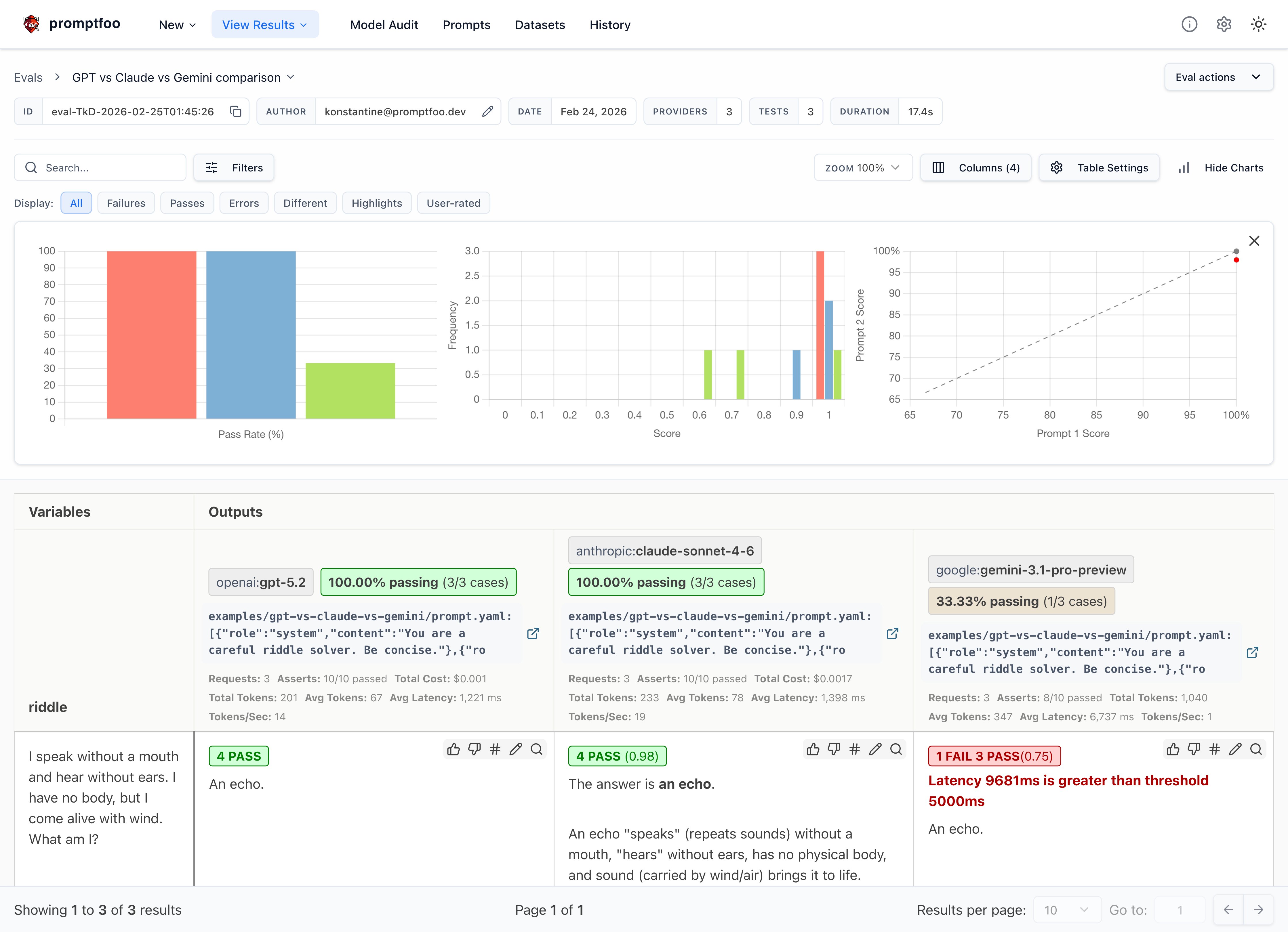
This guide will walk you through setting up a comparison between OpenAI's GPT-5.2, Anthropic's Claude Sonnet 4.6, and Google's Gemini using promptfoo. The end result is a side-by-side evaluation of how these models perform on custom tasks:
Prerequisites
Before getting started, make sure you have:
- The
promptfooCLI installed (installation instructions) - API keys for the providers you want to test:
OPENAI_API_KEYfor OpenAI (configuration)ANTHROPIC_API_KEYfor Anthropic (configuration)GOOGLE_API_KEYfor Google AI (configuration)
Step 1: Set Up Your Evaluation
Create a new directory for your comparison project:
npx promptfoo@latest init --example gpt-vs-claude-vs-gemini
cd gpt-vs-claude-vs-gemini
Open the promptfooconfig.yaml file. This is where you'll configure the models to test, the prompts to use, and the test cases to run.
Configure the Models
Specify the models you want to compare under providers:
providers:
  - openai:gpt-5.2
  - anthropic:claude-sonnet-4-6
  - google:gemini-3.1-pro-preview
You can optionally set parameters like temperature and max tokens for each model:
providers:
  - id: openai:gpt-5.2
    config:
      max_tokens: 1024
  - id: anthropic:claude-sonnet-4-6
    config:
      temperature: 0.3
      max_tokens: 1024
  - id: google:gemini-3.1-pro-preview
    config:
      temperature: 0.3
      maxOutputTokens: 1024
You don't have to compare all three at once. If you only want to compare GPT vs Claude, or GPT vs Gemini, just remove the provider you don't need from the list. Any combination of two or more models works.
Define Your Prompts
Next, define the prompt(s) you want to test the models on. For this example, we'll just use a simple prompt:
prompts:
  - 'Answer this riddle: {{riddle}}'
If desired, you can use a prompt template defined in a separate prompt.yaml or prompt.json file. This makes it easier to set the system message, etc:
prompts:
  - file://prompt.yaml
The contents of prompt.yaml:
- role: system
  content: 'You are a careful riddle solver. Be concise.'
- role: user
  content: |
    Answer this riddle:
    {{riddle}}
The {{riddle}} placeholder will be populated by test case variables.
It's also possible to assign specific prompts for each model, in case you need to tune the prompt to each model:
prompts:
  prompts/gpt_prompt.json: gpt_prompt
  prompts/gemini_prompt.json: gemini_prompt

providers:
  - id: google:gemini-3.1-pro-preview
    prompts: gemini_prompt
  - id: openai:gpt-5.2
    prompts:
      - gpt_prompt
  - id: anthropic:claude-sonnet-4-6
    prompts:
      - gpt_prompt
Step 2: Create Test Cases
Now it's time to create a set of test cases that represent the types of queries your application needs to handle.
The key is to focus your analysis on the cases that matter most for your application. Think about the edge cases and specific competencies that you need in an LLM.
In this example, we'll use a few riddles to test the models' reasoning and language understanding capabilities:
tests:
  - vars:
      riddle: 'I speak without a mouth and hear without ears. I have no body, but I come alive with wind. What am I?'
    assert:
      - type: icontains
        value: echo
      - type: llm-rubric
        value: Do not apologize
  - vars:
      riddle: "You see a boat filled with people. It has not sunk, but when you look again you don't see a single person on the boat. Why?"
    assert:
      - type: llm-rubric
        value: explains that the people are below deck or they are all in a relationship
  - vars:
      riddle: 'The more of this there is, the less you see. What is it?'
    assert:
      - type: icontains
        value: darkness
  # ... more test cases
The assert blocks allow you to automatically check the model outputs for expected content. This is useful for tracking performance over time as you refine your prompts.
promptfoo supports a very wide variety of assertions, ranging from basic asserts to model-graded to assertions specialized for RAG applications.
Step 3: Run the Evaluation
With your configuration complete, you can kick off the evaluation:
npx promptfoo@latest eval
This will run each test case against all configured models and record the results.
To view the results, start up the promptfoo viewer:
npx promptfoo@latest view
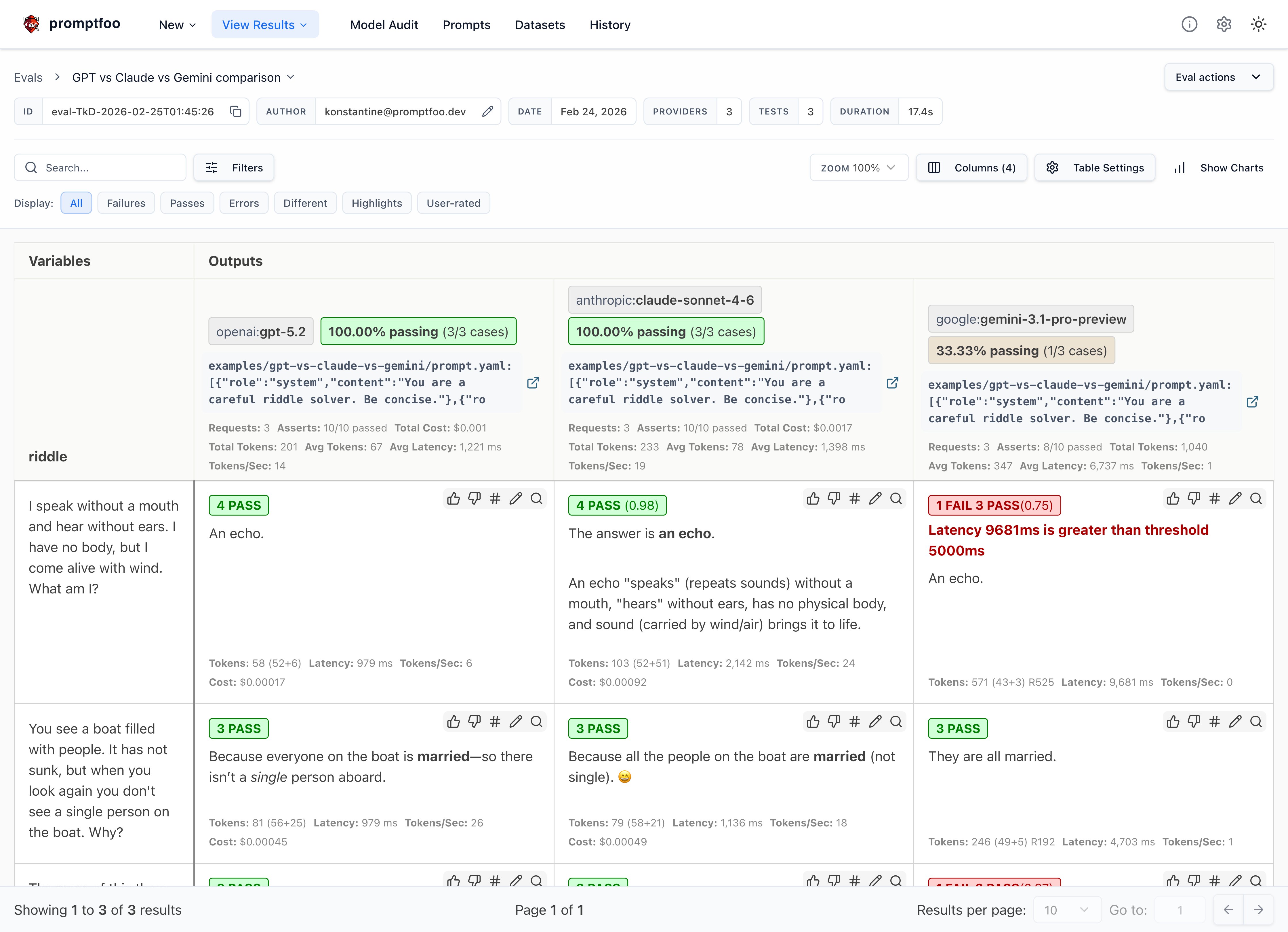
This will display a comparison view showing how each model performed on each test case:
You can also output the raw results data to a file:
npx promptfoo@latest eval -o results.json
Step 4: Analyze the Results
With the evaluation complete, it's time to dig into the results and see how the models compared on your test cases.
Some key things to look for:
- Which model had a higher overall pass rate on the test assertions? In this case, all three models got the riddles correct, which is great - these riddles often trip up less powerful models.
- Were there specific test cases where one model significantly outperformed the other?
- How did the models compare on other output quality metrics.
- Consider model properties like speed and cost in addition to quality.
Here are a few observations from our example riddle test set:
- GPT's responses tended to be short and direct, while Claude often includes extra commentary
- Gemini's responses were the most terse
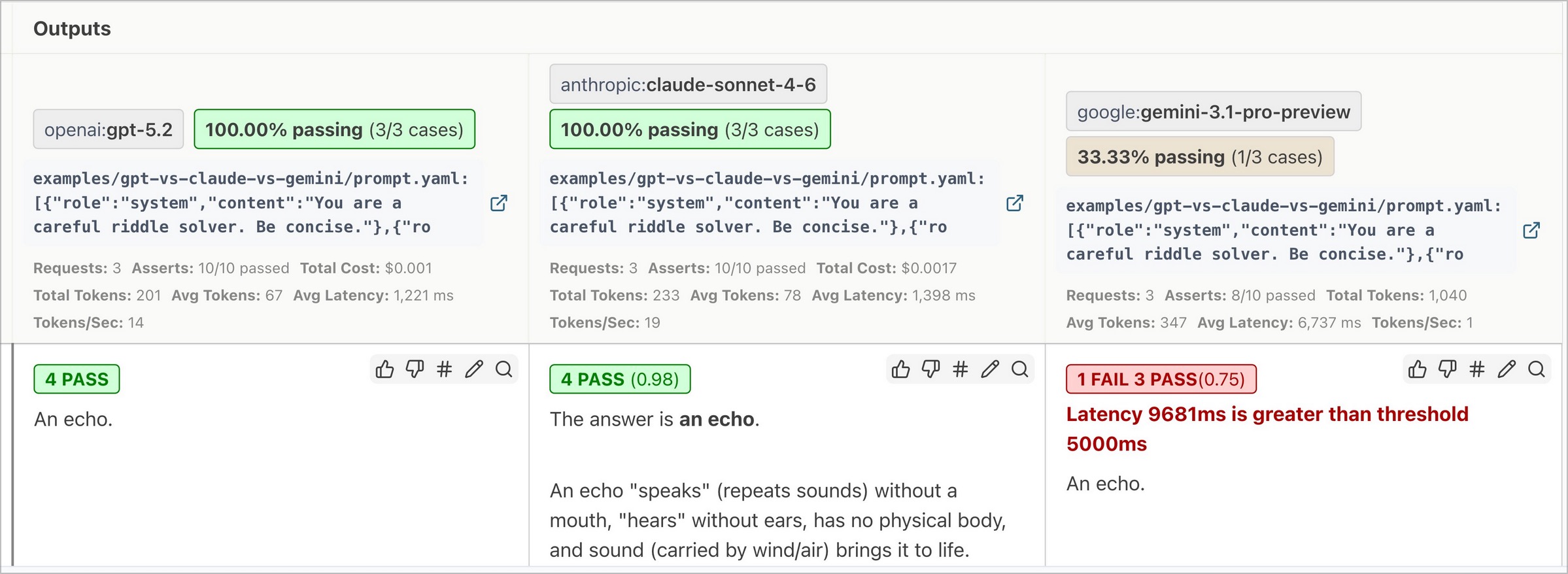
- GPT was the fastest, while Gemini's reasoning overhead made it the slowest
Adding assertions for things we care about
Based on the above observations, let's add the following assertions to all tests in this eval using defaultTest:
- Latency must be under 5000 ms
- Sliding scale Javascript function that penalizes long responses
defaultTest:
  assert:
    # Inference should always be faster than this (milliseconds)
    - type: latency
      threshold: 5000
    # Penalize long responses on a sliding scale
    - type: javascript
      value: 'output.length <= 100 ? 1 : output.length > 1000 ? 0 : 1 - (output.length - 100) / 900'
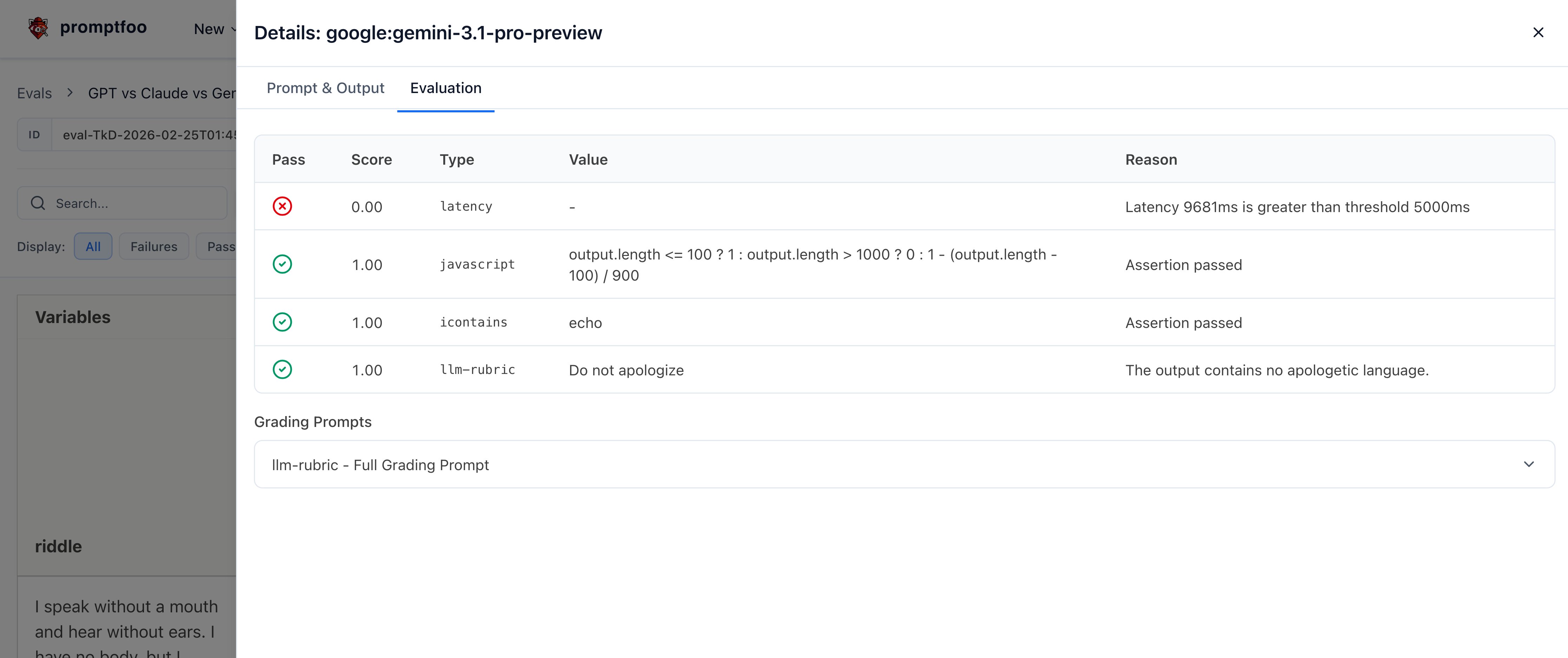
The result is that Gemini sometimes fails our latency requirements:
Clicking into a specific test case shows the individual test results:
The tradeoff between latency and accuracy is going to be tailored for each application. That's why it's important to run your own eval.
Of course, our requirements are different from yours. You should customize these values to suit your use case.
Testing Logic and Reasoning
Riddles are fun, but you can also test models on logic and reasoning tasks. Here are some examples from a Hacker News thread:
tests:
  - vars:
      question: There are 31 books in my house. I read 2 books over the weekend. How many books are still in my house?
    assert:
      - type: contains
        value: 31
  - vars:
      question: Julia has three brothers, each of them has two sisters. How many sisters does Julia have?
    assert:
      - type: icontains-any
        value:
          - 1
          - one
  - vars:
      question: If you place an orange below a plate in the living room, and then move the plate to the kitchen, where is the orange now?
    assert:
      - type: contains
        value: living room
For more complex validations, you can use models to grade outputs, custom JavaScript or Python functions, or even external webhooks. Have a look at all the assertion types.
You can use llm-rubric to run free-form assertions. For example, here we use the assertion to detect a hallucination about the weather:
- vars:
    question: What's the weather in New York?
  assert:
    - type: llm-rubric
      value: Does not claim to know the weather in New York
Testing Vision and Multimodal
If you're working on an application that involves classifying images, you can set up a comparison using promptfoo. Here's an example of a binary image classification task:
providers:
  - openai:gpt-5.2
  - anthropic:claude-sonnet-4-6
  - google:gemini-3.1-pro-preview

prompts:
  - |
    role: user
    content:
      - type: text
        text: Please classify this image as a cat or a dog in one word in lower case.
      - type: image_url
        image_url:
          url: "{{url}}"
tests:
  - vars:
      url: 'https://upload.wikimedia.org/wikipedia/commons/thumb/b/b6/Felis_catus-cat_on_snow.jpg/640px-Felis_catus-cat_on_snow.jpg'
    assert:
      - type: equals
        value: 'cat'
  - vars:
      url: 'https://upload.wikimedia.org/wikipedia/commons/thumb/4/47/American_Eskimo_Dog.jpg/612px-American_Eskimo_Dog.jpg'
    assert:
      - type: equals
        value: 'dog'
Run the comparison with the promptfoo eval command to see how each model performs on your image classification task. While larger models may provide higher accuracy, smaller models' lower cost makes them an attractive option for applications where cost-efficiency is crucial.
The tradeoff between cost, latency, and accuracy is going to be tailored for each application. That's why it's important to run your own evaluation.
Conclusion
By running this type of targeted evaluation, you can gain valuable insights into how these models are likely to perform on your application's real-world data and tasks.
promptfoo makes it easy to set up a repeatable evaluation pipeline so you can test models as they evolve and measure the impact of model and prompt changes.
The key here is that your results may vary based on your LLM needs, so we encourage you to enter your own test cases and choose the model that is best for you.
To learn more about promptfoo, check out the getting started guide and configuration reference.